

Before completing these steps, please ensure you have obtained your email address, password, incoming mail server name (IMAP), and outgoing mail server name (SMTP) from our Support Team.
Step 1: Open the Mail App
Step 2: Add Account
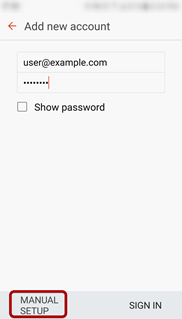
Step 3: Enter your email address and password > Select Manual Setup
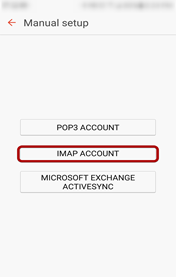
Step 4: Select IMAP Account
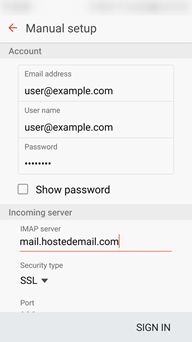
Step 5: Enter Incoming Server settings
Username: Full email address
Password
IMAP Server: mail.hostedemail.com
Security Type: SSL
Port: 993
Step 6: Enter Outgoing Server settings
SMTP Server: mail.hostedemail.com
Security Type: SSL
Port: 465
Tick ‘Authentication required before sending emails’
Username: Full email address
Password
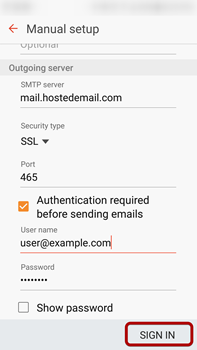
Sign In
Your account should now be successfully added.
Leave a comment
Please sign in to leave a comment.